

On this page
An n8n AI agent is a workflow where a large language model, not a fixed set of IF and Switch nodes, decides what to do next. You build one by wiring a trigger to n8n’s AI Agent node, connecting a chat model as its reasoning engine, and attaching the tools it is allowed to call. The same trigger can then produce different actions depending on context, which is the whole point.
That single shift, from you writing the branching logic to the model choosing it at run time, is what separates an agent from ordinary automation. It is also what makes agents powerful, unpredictable, and worth building carefully. This guide covers what an n8n AI agent actually is, the five components every agent needs, a concrete build walk-through, memory and RAG, safety, multi-agent orchestration, the failure modes that will bite you, and what changes when you push an agent to production.
What an n8n AI agent actually is
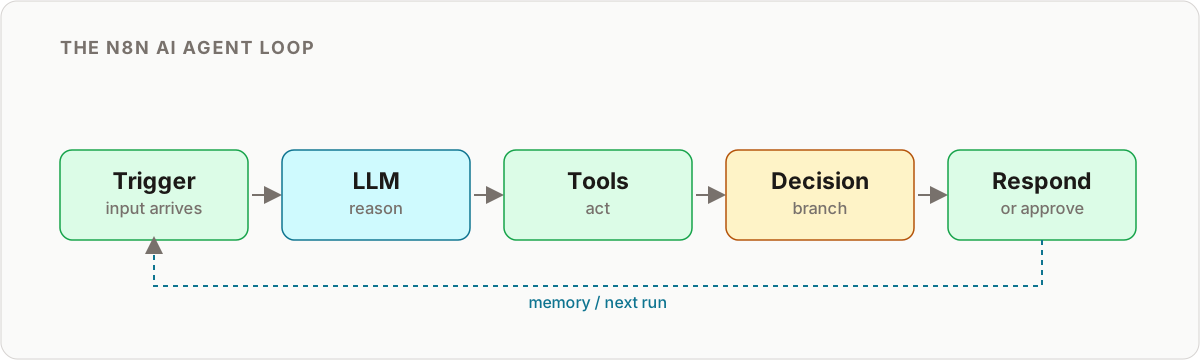
A plain n8n workflow is deterministic. You decide in advance that a “sales” email goes to the sales team and a “support” email gets an auto-reply, and the workflow does exactly that every time. It is fast, cheap, and predictable, and for stable rules it is the right tool.
An AI agent is different. You hand the LLM a goal, a set of tools, and the input, and the model reasons about which tool to call, in what order, and when it is done. It might call a tool, read the result, decide it needs another, and loop until it reaches an answer. You are no longer writing the path. You are defining the boundaries and letting the model find the path inside them.
This is why “agent” is not just a marketing rebrand of “workflow.” The behavior is emergent, so two runs on similar inputs can diverge, which is both the value (it handles cases you never explicitly coded) and the risk (it can do something you never intended).
| Dimension | Plain n8n workflow | n8n AI agent |
|---|---|---|
| Decision logic | Fixed, wired by you (IF, Switch) | Chosen by the LLM at run time |
| Handling novel input | Fails or hits a default branch | Reasons about it, attempts a path |
| Predictability | High, same input to same output | Lower, output varies with context |
| Cost per run | Near zero | Model tokens per call, often several calls |
| Best for | Stable, well-defined rules | Messy, open-ended, or judgment tasks |
| Debugging | Trace the branch | Trace the reasoning and every tool call |
The practical rule: if you can write the rules down completely, use a normal workflow. Reach for an agent only when the input is genuinely open-ended or the decision needs judgment. If you are building your very first one end to end, the step-by-step in building your first AI agent with n8n walks through the node wiring in detail.
The five components of an n8n AI agent
Whatever you build, an agent in n8n is assembled from the same five parts. Get these right and the rest is refinement.
1. Trigger
The trigger is what wakes the agent. It can be a schedule (Schedule Trigger), an inbound message (Chat Trigger, Gmail, or IMAP), a form submission (Webhook), or a row appearing in a database. The trigger also shapes the agent: a chat trigger implies a conversational, memory-heavy agent, while a schedule trigger implies a batch worker that runs and exits.
2. Model (the reasoning engine)
n8n’s AI Agent node needs a chat model attached to it. This is the brain that reads the input, plans, and picks tools. Model choice is a cost and quality lever, not a detail: a strong general model for reasoning and tool use, or a cheaper, faster model for high-volume classification and routing. You can and should mix models across different agents.
3. Tools
Tools are what the agent can actually do. In n8n you attach nodes to the AI Agent node as tools, each with a clear name and description so the model knows when to use it. A tool might be a Google Sheets lookup, an HTTP Request to your CRM, a Send Email node, or another workflow entirely. The description you write matters as much as the code, because the model decides whether to call a tool based on that description.
4. Decision logic
Inside an agent, the model handles most branching. But you still wrap it in n8n logic: an IF node to enforce a hard rule the agent must never override, a Switch to route by the agent’s stated intent, or a validation step that checks the agent’s output before anything acts on it. Think of this as guardrails around the model’s judgment, not a replacement for it.
5. Memory
Without memory, every run starts blank. n8n offers memory nodes you attach to the agent so it holds context within a session (keyed by a session ID). For context that must survive across separate runs, you persist it yourself to a database or vector store and reload the relevant slice next time. Memory is where most “why did it forget?” bugs live, and it deserves its own design pass, covered in giving n8n AI agents persistent memory.
A build walk-through: a lead-triage agent
Abstract components click into place when you build something real. Here is a lead-triage agent that reads inbound form submissions, decides how hot each lead is, enriches it, and routes it, with a human check before anything customer-facing goes out.
-
Trigger. A Webhook node receives the lead form payload (name, email, company, message). This fires the agent once per submission.
-
Agent node and model. Add the AI Agent node and attach a chat model. In the system prompt, state the goal plainly: “You triage inbound sales leads. Classify each as hot, warm, or cold, explain why in one sentence, and draft a short reply. Never invent facts about the company.” A tight, explicit prompt is your first line of quality control.
-
Tools. Attach the tools the agent may use: an HTTP Request tool to look up the company domain, a Google Sheets tool to check whether the lead already exists, and a Send Email tool for the reply. Give each a precise description so the model calls the right one at the right moment.
-
Let it reason. On a real submission, the agent might call the enrichment tool, read the result, decide the lead is hot, check the sheet to confirm it is new, then draft a reply. You did not hard-code that sequence. The model assembled it from the goal and the tools.
-
Guardrail with logic. Route the agent’s classification through a Switch node. Hot leads go to a Slack channel with the draft and approve and deny buttons. Cold leads are logged to the sheet with no outreach. This is where your fixed business rules override model judgment.
-
Human in the loop. The Slack approval gates the actual send. Nothing reaches the prospect until a person clicks approve. Once approved, the workflow calls the Send Email tool and logs the outcome.
Notice the pattern: the agent does the judgment work (reading, classifying, drafting), and deterministic n8n nodes handle the parts where a mistake is expensive. That division is the heart of a reliable agent.
Memory and RAG: giving the agent context
There are two kinds of context an agent needs, and people conflate them.
Conversational memory keeps track of the current exchange. A support chat agent needs to remember what was said three messages ago. n8n’s memory nodes handle this within a session, keyed by a session ID so two users never bleed into each other’s context.
Knowledge retrieval (RAG) is different. It lets the agent pull relevant facts from a body of documents it was never trained on: your docs, past tickets, product specs. You embed those documents into a vector store, and at run time the agent retrieves the few most relevant chunks and reasons over them. This is what stops an agent from hallucinating your pricing or policy.
You do not need RAG for a first agent. Add it only when the agent must answer from a knowledge base rather than from the input it is handed. When you do, keep the retrieved context small and relevant, because dumping fifty chunks into the prompt raises cost and often lowers answer quality.
Human-in-the-loop and the trust model
The single highest-value safety feature for any early agent is a human approval step. Route the proposed action, the email to send, the record to update, the refund to issue, to a person with approve and deny buttons before it executes. It costs one node and saves you from the one bad decision that reaches a customer.
Beyond approvals, think in terms of a trust model: what is this agent allowed to touch, and what is the blast radius if it goes wrong? Scope tools tightly. An agent that only needs to read a sheet should not have write access. An agent that drafts replies should not also hold your billing credentials. The narrower the tool set, the smaller the damage any single mistake can do. This scoping discipline is the core of a sound AI agent security and trust model, and it matters more the more autonomy you grant.
A useful ladder for granting autonomy:
- Level 0: Agent drafts, human sends everything. Start here.
- Level 1: Agent acts on low-risk cases automatically, escalates the rest.
- Level 2: Agent acts autonomously within tight limits, logs everything, human audits after the fact.
Move up a rung only after the current one has run clean for a meaningful volume. Do not start at Level 2.
Multi-agent and orchestration
Once you have one working agent, the temptation is to keep bolting tools onto it until it does everything. Resist that. An agent holding a dozen tools becomes slow, expensive, and nearly impossible to debug, because you can never be sure why it chose one tool over another.
The better pattern is orchestration: one coordinating agent that delegates to narrow specialist agents, each exposed as a tool or a separate sub-workflow. A support orchestrator might route to a billing agent, a technical agent, and an account agent, each with its own small tool set and prompt. Each specialist stays simple enough to reason about on its own.
This decomposition is not just tidy, it is what makes the system maintainable. When something breaks, you know which agent to look at. The trade-offs and layering of this approach are worth understanding before you scale up, and the three-layer agent stack breaks down where orchestration, agents, and tools each belong.
Common failure modes and how to debug them
Agents fail in ways plain workflows do not, because the failure is often in reasoning rather than in a node. The usual suspects:
- The agent ignores a tool. Almost always a weak tool description. If the model does not understand when a tool applies, it will not call it. Rewrite the description to say plainly what the tool does and when to use it.
- Tool output never reaches the model. A schema or formatting mismatch means the agent gets back something it cannot parse. This is one of the most common and most confusing bugs.
- It hallucinates facts. Usually missing context. The agent is reasoning from nothing because you did not give it the data (or your RAG retrieval returned the wrong chunks).
- It loops or stops early. Vague stop conditions. Your prompt needs to state clearly when the task is complete and when to give up.
- Cost spikes. The agent is making far more tool calls than expected, often because the prompt is ambiguous about the goal and it keeps exploring.
The debugging method is the same each time: read the execution log and follow the agent’s reasoning step by step, watching exactly what each tool returned. The problem is nearly always visible in that trace once you look. A systematic approach to reading these traces is laid out in the n8n AI agent debugging guide.
Production and cost considerations
Moving from a demo that works to an agent you trust in production changes what you optimize for.
Cost is dominated by calls, not cleverness. Most agent spend comes from repeated model calls across many runs, not from any single long response. The levers that actually move the bill: use a cheaper model for routing and classification, cut unnecessary tools so the agent explores less, and keep prompts and retrieved context lean.
Reliability comes from constraints. Set timeouts and retry logic on tool calls. Cap how many steps an agent may take before it must stop. Validate the agent’s output with a deterministic node before anything acts on it. Every constraint you add narrows the space of things that can go wrong.
Observability is not optional. Log every run, every tool call, and every decision. When an agent behaves oddly in production (and it will), the log is the only thing that tells you why. Treat the execution history as your primary debugging surface from day one.
Extend reach with MCP when needed. As agents mature, you may want them to reach tools beyond n8n’s node library. The Model Context Protocol is the emerging standard for exposing external capabilities to agents in a structured way, covered in the n8n MCP and Claude Code guide.
Key takeaways
- An n8n AI agent lets an LLM choose the next action at run time, so it handles open-ended input a fixed workflow cannot, at the cost of predictability.
- Every agent is five parts: trigger, model, tools, decision logic, and memory. Getting the tool descriptions and prompt right is most of the quality.
- Start with one narrow agent and a human approval gate. Add memory, RAG, and autonomy only when the simple version is proven.
- Scope tools tightly, log everything, and match the model to the job to keep both risk and cost under control.
- When it misbehaves, the answer is in the execution trace: follow the reasoning and the tool outputs step by step.
Your next step
Pick one narrow, annoying task, lead triage, email drafting, ticket routing, and build a single agent for it with a human approval step before anything acts. Ship that, watch the logs, and only then decide what to automate next.
When you are ready to build, the AI agents with n8n and LangChain tutorial walks through it hands-on.
Frequently asked questions
What is an n8n AI agent?
An n8n AI agent is a workflow built around n8n's AI Agent node, where a large language model reasons over the input and chooses which connected tools to call to reach a goal. Unlike a standard workflow that follows a fixed path, an agent decides its own next step at run time, so identical triggers can lead to different actions depending on context.
What is the difference between an n8n workflow and an n8n AI agent?
A regular workflow follows fixed, predetermined logic that you wire by hand with IF and Switch nodes. An AI agent uses an LLM to interpret the input and pick an action from a set of tools, so the branching is decided at run time rather than designed in advance. Use a plain workflow when the rules are stable and an agent when the input is messy or open-ended.
How do I build an AI agent in n8n?
Add a trigger, an AI Agent node, and a chat model, then attach the tools the agent is allowed to use (such as a Google Sheet, an HTTP request, or a Send Email node). Write a system prompt that states the goal, the rules, and when to stop, then test with real inputs and add a human approval step before any action that reaches a customer.
Do I need a vector database to build an AI agent in n8n?
Not for a first agent. Simple agents like an email responder or lead router work fine with just a chat model and its tools. A vector store matters once the agent needs to search a knowledge base with RAG rather than reason only over the input it is handed.
How do I give an n8n AI agent memory?
Attach a memory node to the AI Agent node so it retains conversation context within a session, keyed by a session ID. For memory that survives across runs, persist facts to a database or vector store and load the relevant slice back into the prompt on the next execution.
How do I stop an AI agent from doing something harmful or embarrassing?
Add a human-in-the-loop step. Route the agent's proposed action to Slack or email with approve and deny buttons, and only let it send, post, or write once a person confirms. Combine this with scoping tools tightly so the agent cannot reach systems it should never touch.
Which model should I use for an n8n AI agent?
Use a capable general model for reasoning and tool selection, and a cheaper, faster model for high-volume routing or classification steps. Match the model to the job rather than defaulting to the largest one, since most agent cost comes from repeated calls, not any single response.
Can n8n run multiple AI agents together?
Yes. A common pattern is an orchestrator agent that delegates to specialist sub-agents, each exposed as a tool or a separate sub-workflow. Keep each agent narrow, because a few focused agents are far easier to debug and cost-control than one agent holding a dozen tools.
Related reading
Keep learning
Step-by-step n8n tutorials, and free templates you can import and adapt.
Browse tutorials →Browse templates