

On this page
If you want to build your first AI agent in n8n, here is the short version: you will build two working agents in an afternoon, a keyword-opportunity finder that pulls Google Search Console data and surfaces winnable keywords every Monday, and a content-brief generator that turns any keyword into a writer-ready brief. All you need is a running n8n instance, one LLM API key, and one data source. This n8n AI agent tutorial walks you through both, step by step, then shows you how to chain them into a single autonomous system.
You are a master at ranking websites. So why is your own agency still running on manual keyword research and hand-built content briefs? That operational drag is the ceiling on your growth. The fix is not another SaaS subscription. It is an agent that works while you sleep.
What You Will Build
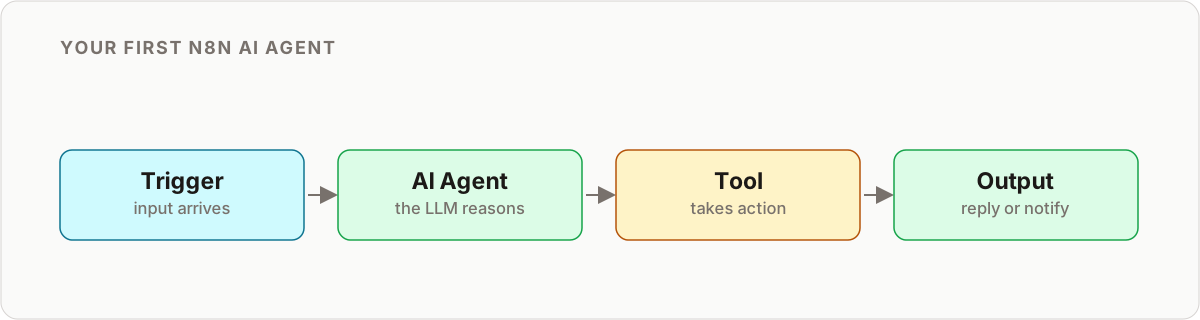
Two agents, both following the same core loop that every n8n agent uses: a trigger fires, data comes in, an LLM reasons over it, and an action goes out. Learn that loop once and every future agent is just a variation on it.
- A Keyword Opportunity agent that runs weekly, reads your GSC data, and delivers a ranked shortlist of winnable keywords.
- A Content Brief generator that takes one keyword and returns a structured brief with title, outline, and semantic terms.
Then you chain them so agent one hands work directly to agent two.
What You Need Before You Start
Everything below is either free or has a free tier to get started. You do not need to write any code.
| Component | What it does | Options | Required? |
|---|---|---|---|
| n8n instance | Runs and schedules your workflows | n8n Cloud, or self-host on Hetzner / DigitalOcean | Yes |
| LLM API key | The reasoning “brain” of the agent | OpenAI, Anthropic, or Google | Yes |
| Google Search Console | Supplies real query and CTR data | GSC OAuth credential | Yes (agent 1) |
| SEO tool API | Adds keyword difficulty scores | Ahrefs, Semrush, DataForSEO | Optional |
| SERP API | Reads competitor pages for briefs | Serper, SerpAPI, ScraperAPI | Yes (agent 2) |
| Slack or Google Sheets | Where results get delivered | Either works | Recommended |
A note on hosting
n8n Cloud is the fastest way to get moving; you click, connect, and build. Self-hosting takes an hour more of setup but is usually the cheaper path once you run these agents across several clients, because the cost is a flat server bill rather than a per-execution charge. If you are agency-side and expect volume, self-host from the start.
Which LLM should you use?
Any of the three major providers will run the prompts in this guide well. Pick on two factors: cost per token and how the model handles structured output. For the summarized inputs used here, the cheaper mid-tier models are more than capable, so do not reach for the flagship model out of habit. Whichever you choose, store the key in n8n’s credential store, never in a node’s plain fields, so it stays out of your exported workflow JSON.
Workflow 1: The Keyword Opportunity Agent (Step by Step)
This agent finds low-competition, high-intent keywords automatically, replacing hours of manual digging. It is a four-to-five node build.
Step 1: Add the trigger
Drop in a Schedule Trigger node and set it to run every Sunday at 8 PM. Fresh opportunities will be waiting when you open your laptop Monday morning. This one node is why it is an agent and not a script you have to remember to run.
Step 2: Pull your GSC data
Add the Google Search Console node and query the last 30 days. Filter for the pattern that signals untapped potential: high impressions paired with a low click-through rate. These are queries Google already shows you for but nobody clicks, often because you rank on page two or your title is weak. That gap is your opportunity pool.
Step 3: Filter and enrich
Add a Filter node to strip out branded queries; you already rank for those. Then, if you have an SEO tool API, add an HTTP Request node to enrich each remaining keyword with its Keyword Difficulty score. Now every candidate carries impressions, CTR, and difficulty, the three numbers your LLM needs to judge it.
Step 4: Add the AI brain
This is the reasoning step. Add an HTTP Request node (or the built-in AI Agent node) pointed at your LLM and send it the enriched list with a prompt like this:
You are an expert SEO analyst. The list below contains keywords with
their impressions, CTR, and keyword difficulty.

Identify the top 3 "hidden opportunity" keywords. For each, explain WHY
it is an opportunity (e.g. "high impressions and low KD means we can
rank with one strong article") and suggest a compelling blog post title.

[Your enriched keyword list here]
Keep the input summarized rather than raw. Sending three numbers per keyword instead of full reports keeps token cost low and the model’s reasoning sharp.
Step 5: Deliver the output
Add a Slack node to post the shortlist to a #keyword-opportunities channel, or a Google Sheets node to append them to a client report. That is the full loop: trigger, data, reasoning, action. You just built your first AI agent.
For a deeper look at the node patterns behind agents like this, see our guide to building AI agents in n8n.
Workflow 2: The Content Brief Generator (Step by Step)
This agent turns a single target keyword into a comprehensive brief your writers can act on immediately.
Step 1: Choose the trigger
Use a Manual Trigger for one-off briefs while you test. In production, swap in a Webhook node so the workflow fires when a card moves to your “Briefing” stage in Trello, Asana, or Notion. Same agent, hands-free.
Step 2: Analyze the SERP
Add an HTTP Request node calling your SERP API to fetch the top 10 ranking pages for the target keyword, then pull their content. This is what the model reasons over: what is already winning, so your brief can beat it rather than repeat it.
Step 3: Add the AI brain
Send the scraped content to your LLM with a prompt that forces a structured, usable output:
You are a world-class content strategist. Below is the text from the
top 10 Google results for the keyword "[Keyword]".

Analyze it and produce a content brief for a writer, including:
- An SEO-optimized, compelling title
- A meta description under 160 characters
- A recommended structure with H2s and H3s
- 5-7 essential semantic keywords to include
- 3-5 critical questions the article must answer
Step 4: Deliver the brief
Add a Google Docs node to create a document from a template and populate it with the AI output, then send the link back to your project tool or Slack. Your writer opens a finished brief, not a blank page.
Test Each Agent Before You Trust It
Do not schedule an agent and walk away on day one. Run it manually a few times first and watch what the LLM actually returns.
- Pin your data. In n8n you can pin the output of a node during testing so you are not burning API calls on every tweak. Pin the GSC or SERP output, then iterate on your prompt against the same fixed input until the response is consistent.
- Read the reasoning, not just the answer. Ask the model to explain why it picked each keyword. If the explanations are weak, your input data or prompt is the problem, not the model.
- Handle the empty case. Some weeks GSC will return few high-impression, low-CTR queries. Add an IF node so the agent posts “no strong opportunities this week” rather than sending the LLM an empty list.
Once a manual run produces output you would be happy to send a client, flip the trigger back to schedule and let it run.
From Two Workflows to One Agent System
Separate workflows are useful. A connected system is transformative. The bridge is the Execute Workflow node.
Go back to the Keyword Opportunity agent. After it identifies its top keyword, add an Execute Workflow node that calls the Content Brief generator and passes that keyword as input. Now the system runs end to end on its own: Sunday night it finds the opportunity, generates the brief, and drops a finished document in your writer’s queue, with zero human handoff.
This is where most people’s first agent starts to feel real, and also where it starts to break in subtle ways. Two things matter as you scale:
- Memory. If you want an agent to remember prior runs or hold context across steps, you need to design that in deliberately. Our n8n AI agent memory guide covers the patterns.
- Debugging. Chained agents fail in quiet ways, one bad SERP response can poison a whole run. Keep our n8n AI agent debugging guide close for when a run does not do what you expect.
As you connect agents to more client data and more tools, think about permissions too. Before you let an agent take real actions on real accounts, read our AI agent security and trust model guide so you are giving each agent only the access it needs.
Where to Go Next
You now have the core loop and two working agents. The natural next steps:
- Ship one this week. Build the Keyword Opportunity agent first; it is the faster win and proves the value immediately.
- Add memory once a single-run agent stops being enough.
- Connect your dev tools. If you work in an IDE, the n8n MCP and Claude Code guide shows how to build and manage workflows without leaving your editor.
- Expand the fleet. The same trigger-data-reason-act loop builds agents for backlink monitoring, technical audits, and client reporting.
Key Takeaways
- Building your first AI agent in n8n is a four-step loop: trigger, data in, LLM reasoning, action out. Everything else is a variation on it.
- You need three things to start: an n8n instance, one LLM API key, and one data source. No code required.
- Start with the Keyword Opportunity agent. It delivers value in an afternoon and teaches the whole pattern.
- Chaining is the multiplier. The Execute Workflow node turns two automations into one autonomous system.
- Plan for memory, debugging, and security early so your agents stay reliable as you scale them across clients.
Frequently asked questions
What do I need to build my first AI agent in n8n?
Three things: a running n8n instance (cloud or self-hosted), one LLM API key from OpenAI, Anthropic, or Google, and at least one data source such as Google Search Console. A SERP API is optional and only needed for the content-brief workflow.
Is n8n good for building AI agents?
Yes. n8n gives you visual triggers, native nodes for most SEO data sources, an HTTP Request node for any LLM API, and an Execute Workflow node to chain agents together. You get the flexibility of code with the speed of a visual builder, which is why it is a common first choice for AI agent workflows.
Do I need to know how to code to build an n8n AI agent?
No. Every step in this tutorial uses configuration, not code. You paste API keys into credentials, drag nodes onto a canvas, and write plain-English prompts. Light expression syntax helps for mapping data between nodes, but you can build both agents without writing a single function.
What APIs do I need for an SEO agent in n8n?
At minimum an LLM API key and Google Search Console access. Add your SEO platform's API (Ahrefs, Semrush, or similar) to enrich keywords with difficulty scores, and a SERP scraping API if you want the content-brief workflow to read competitor pages automatically.
How do I connect two n8n agents together?
Use the Execute Workflow node. Have the keyword-opportunity agent call the content-brief workflow directly once it finds a strong keyword, passing that keyword as input, so the system goes from opportunity to draft brief with no manual step in between.
Can an n8n agent replace paid rank-tracking software?
For a scrappy setup, the keyword-opportunity workflow gets you a comparable daily rank check using a SERP API and a spreadsheet. It will not match a mature rank tracker's historical reporting UI, but it removes the subscription cost for basic monitoring.
How much does it cost to run these agents?
The main variable cost is LLM tokens, which are small for the prompts in this guide because you send summarized data, not raw pages. Self-hosted n8n has a fixed server cost regardless of how many times a workflow runs, so cost per execution drops as volume grows.
How long does it take to build the first agent?
The keyword-opportunity agent is a four-to-five node workflow you can build and test in an afternoon once your credentials are connected. The content-brief generator is similar. Most of the time goes into refining prompts, not wiring nodes.
Related reading
Still broken?
Work through the error-handling tutorial. It shows how to catch, retry and alert on failures so the next one tells you exactly what went wrong.
Open the tutorial →